


The partner teams getting real leverage from AI have one thing in common, and it isn't the model. The routine work is already done when they sit down.
Most AI setups fail quietly. A task does not fire, a note comes back blank, a draft lands in the wrong folder, and nothing tells you. The question that matters is not what the model can do. It is how you know your AI actually ran.
I have been running my own version of this at Bluethread for a while. The more I compared notes with people in the field, the more the same pattern showed up under different tools. So I wrote it down as four layers: Record, Route, Run, and Review.
This is the long version, part field observation and part how I run my agency. You do not need my stack. Mine includes Gong, Granola, HubSpot, Google Workspace, Slack, Dust, and Claude. Yours might look completely different. The tools matter less than the small decisions about how work gets filed, prepared, run, and checked, and those decisions are what this piece is about.
Four layers, one job each
There are four layers, and the order matters.
Record. One folder per partner, the same structure every time. History, context, and approved work live somewhere you trust.
Route. One front door to ask questions, find information, and get work built.
Run. Routine work happens on a schedule, before you sit down.
Review. AI drafts, operators decide, and approved finals feed back into the Record.
Underneath all four are the sources: email, calendar, call recordings, CRM, Slack, plus whatever each partner runs on, from a PRM to a co-sell platform. There is nothing to migrate. You connect what you already use, and the system reads from all of it.
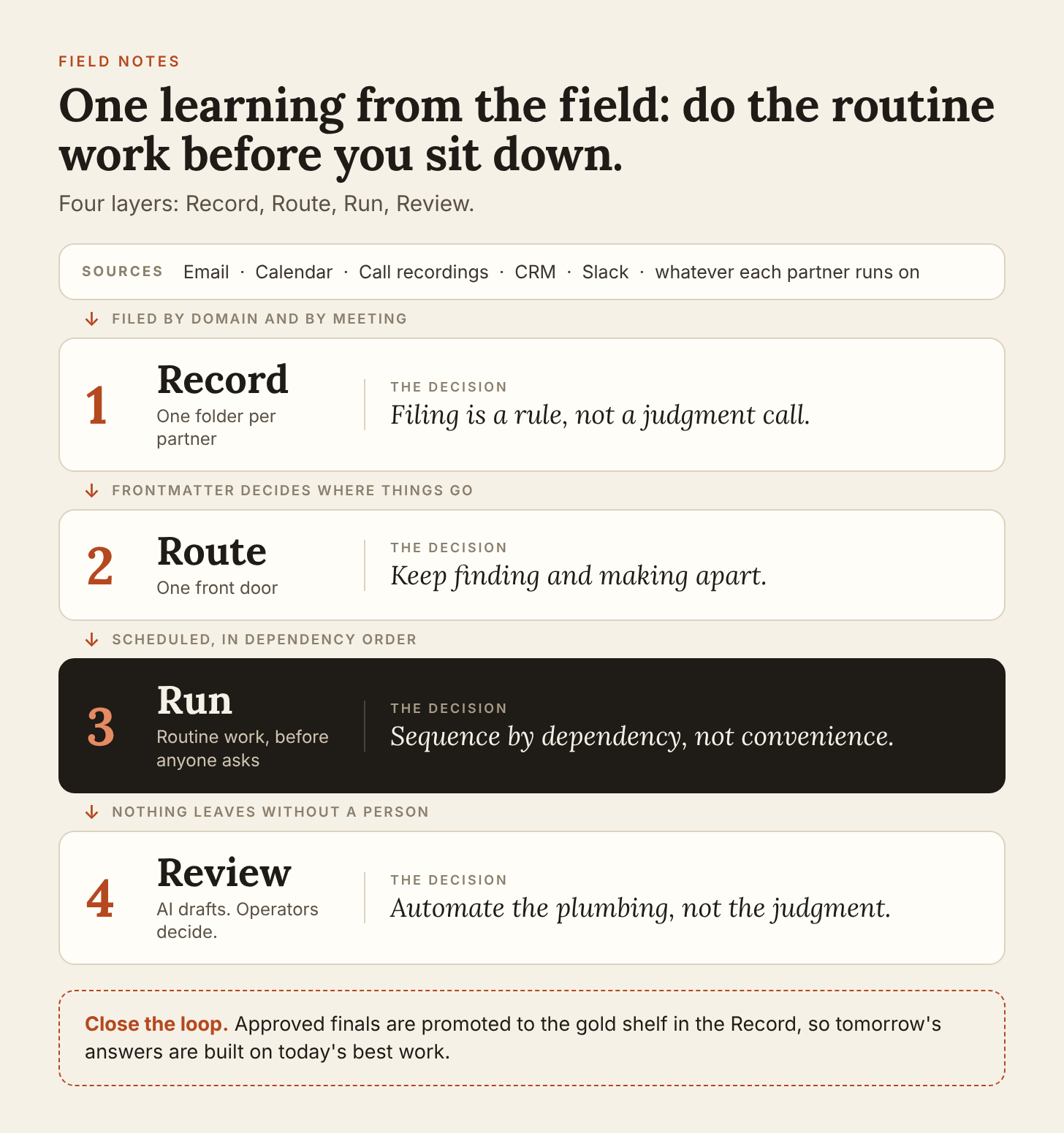
The rest of this piece takes one layer at a time. Each comes down to one decision that is easy to skip and expensive to skip.
Record: filing is a rule, not a judgment call
The decision that matters in the Record is that the system decides where things go, not whoever is in a hurry on a Tuesday.
Every partner gets one folder with the same shape: a master record, emails, meeting notes, and health reports. At the top of the master record sits a few lines of frontmatter, and those lines are what every scheduled task reads.
---
partner: "[[Example Partner]]"
partner_type: SI
partner_status: Active
partner_healthmonitor: true
domains:
  - example.com
---
## Current Status
## Key Contacts
## Outreach Log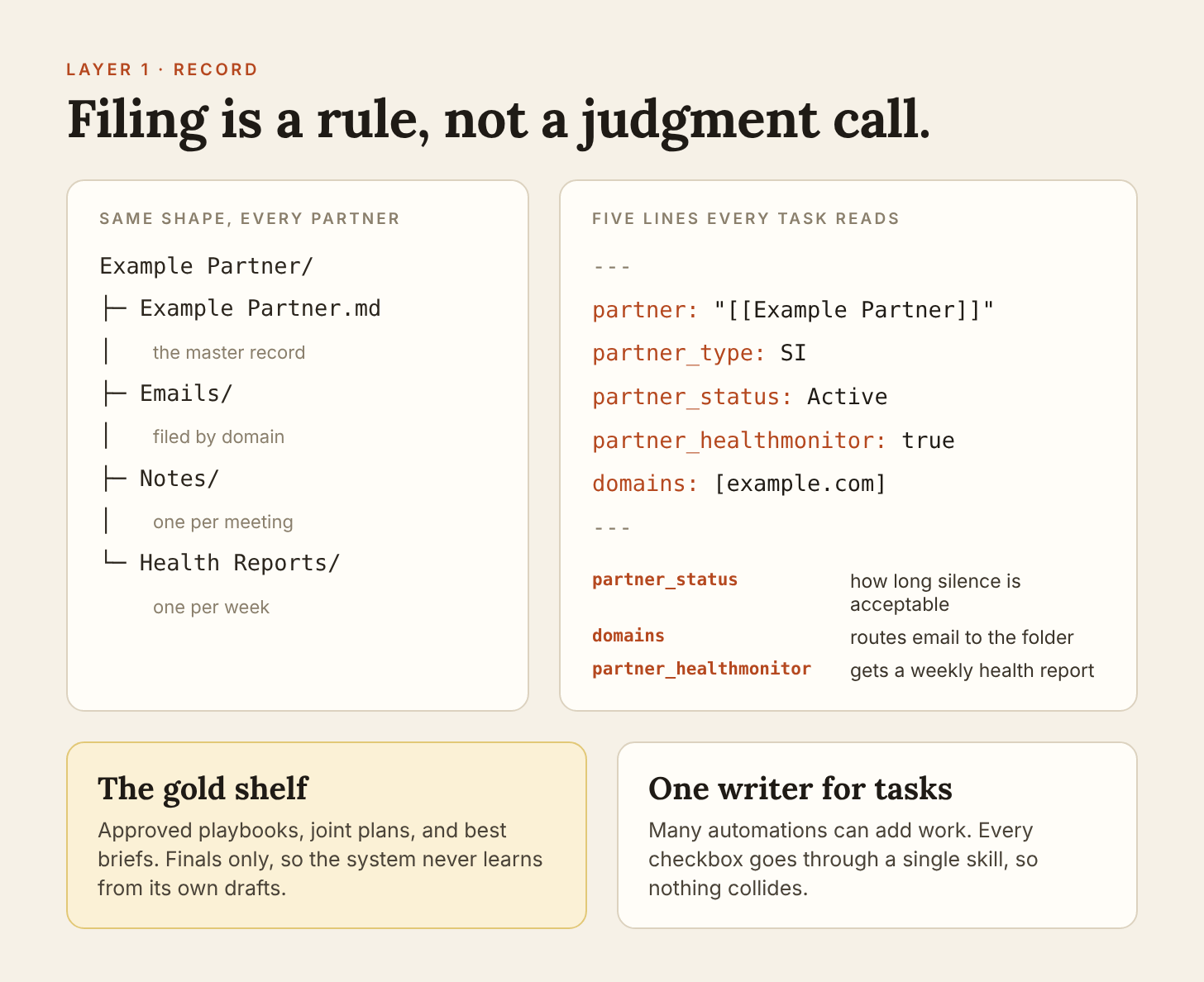
The status says how long silence is acceptable. The domains route inbound email into the right folder. The monitor flag decides who gets a weekly health report. Nothing in a task prompt names a partner, so adding one is a few lines of frontmatter, not a rewrite.
Two more rules keep the Record trustworthy.
A gold shelf, finals only. Approved playbooks, joint plans, and best briefs go on it. Drafts never do, so the system learns from your best work and not from its own first attempts.
One writer for the task list. Many automations can create tasks, but every checkbox goes through a single skill. Same shape, same archive and expiry rules, no collisions.
Pick a home that outlives any one AI session. Obsidian, Google Drive, Notion, and NotebookLM all work. A chat history does not. If I were starting over, this is the layer I would build first, because everything above it reads from it.
Route: one front door, two jobs
The decision in the Route layer is to give the system one front door and keep two jobs apart: finding and making.
The front door is wherever your team already asks questions, usually Slack or Teams, with Claude or OpenAI behind it. If using the system means opening another app, people will skip it.
Behind the door sit two agents.
Find answers questions from the Record. What did we agree with this partner? What is the precedent for this kind of deal? What did they last say, and when?
Make builds things from what Find surfaces: a partner brief, call prep, a follow-up, a QBR, a joint plan.
At Bluethread we use one tool to find context and another to build from it. The split is deliberate because the two jobs fail differently. Find fails by being wrong about what was agreed, so it has to stay close to the source and show where an answer came from. Make fails by sounding right, so everything it produces goes to a person before it goes anywhere else. Collapse them into one chat window and you lose both guardrails.
Run: sequence by dependency, not convenience
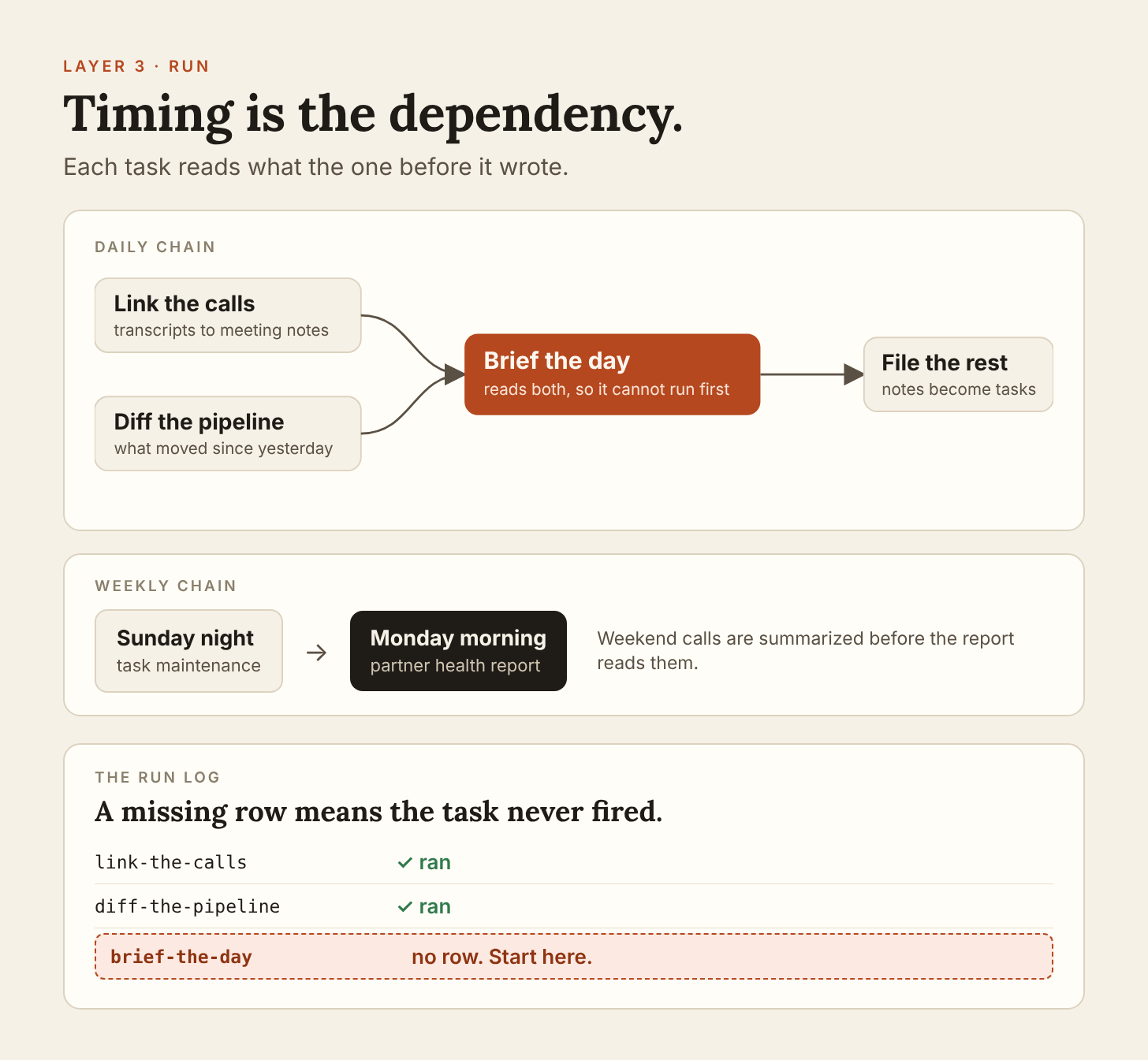
The decision in the Run layer is the order. Scheduled tasks are not a pile of automations. They are a chain, and each link reads what the one before it wrote.
A daily chain looks like this:
Link the calls. Yesterday's recordings and transcripts become summaries on the matching meeting notes.
Diff the pipeline. Pull it live and compare it to yesterday. What moved overnight matters more than what the total was last Wednesday.
Brief the day. One note per meeting, email filed by domain, tasks written. This task reads the outputs of the first two, so it cannot run before them.
File the rest. Capture messages from Slack become checkboxes through the single task writer.
One operator I know had seven scheduled tasks finished before 7:15 a.m. The impressive part was not the count. It was that the timing was treated as a dependency, not a preference.
The weekly chain follows the same logic. Maintenance runs Sunday night, so nothing is fighting over the task file. The partner health report runs Monday morning, so weekend calls have already been summarized by the time it reads them. If a report keeps reading stale data, the fix is usually a schedule change, not a prompt change.
Silence becomes a signal. Because each partner's status lives in frontmatter, the Monday report can say who has gone quiet and for how long. One setup I saw flagged partners being recruited after 14 days of silence and prospects after 90. Pick your own thresholds. The point is that a missed follow-up becomes a line in a report instead of something you notice a quarter later.
The on-demand plays use the same skills, called by hand: prep me for this call, draft the follow-up, build the co-sell brief. Same inputs, same format, every time.
Review: automate the plumbing, not the judgment
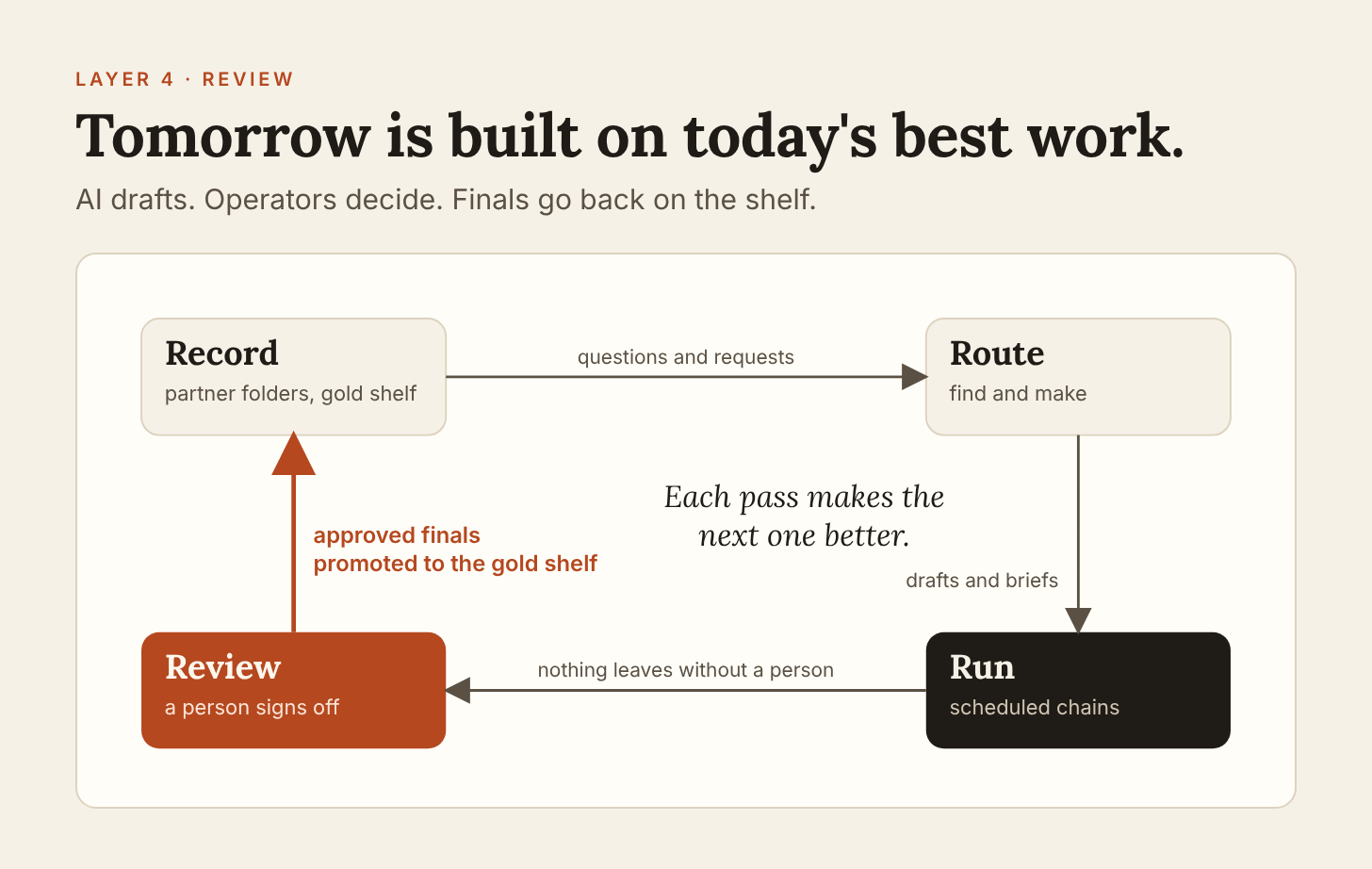
The decision in the Review layer is where the human sits. Automate maintenance and handoffs: filing, routing, flagging stale items, queuing drafts. Keep judgment and anything outbound with a person. That is what makes the first three layers safe to run unattended.
Three habits do the work.
Human sign-off on anything outbound. Emails, Slack posts, CRM updates, and anything a partner will see. The system drafts and queues. A person sends.
A run log. Every scheduled task writes one row when it runs, and a degraded run says why. A missing row means the task never fired. When something looks off, start at the log, not at the output.
Thirty minutes a month. What went stale, who went quiet, and which skills are earning their keep. Anything that has not paid for itself gets retired.
Then close the loop. When a draft is approved and becomes final, promote it to the gold shelf in the Record. Tomorrow's answers are built on today's best work, which is why the system gets better with use instead of just busier.
What breaks
All of this is only as good as your ability to tell, quickly, whether it actually ran. The failures I see most are quiet ones.
The task that never fired. Nothing errors. The briefing just is not there. This is why the run log exists, and why a missing row is the signal.
The edit that changed nothing. Updating a task's prompt in a file does not change what the scheduler runs. Verify the run, not the file.
The blank note. When an output comes back empty instead of wrong, suspect a renamed heading. Automations that parse by position break silently when someone tidies a template.
The shelf that fills with drafts. If anything can reach the gold shelf without a person approving it, the shelf stops meaning anything within a month.
Folder sprawl. Two shapes for the same thing is how one-writer rules and domain routing quietly stop working. Keep the structure boring and identical.
None of these is exotic. Each one is cheap to catch if you built the log and the structure first, and expensive if you did not.
Start Monday: the 30 minute version
You do not need seven scheduled tasks or a vault of thousands of notes. You need one loop that works. Start here with the tools you already have.
Pick one partner and make the folder. Master record, emails, notes, health reports. Same names you will use for every other partner.
Write five lines of frontmatter. Partner, type, status, monitor flag, and email domains. These are the keys everything else will read.
Schedule one task. Start with the morning brief: today's meetings, with the last note and last email for each partner attached. Run it manually twice before you schedule it.
Start a run log. One row per run. If the row is not there tomorrow, you will know before anything else does.
Set one rule for outbound. Nothing leaves without a person. Write it down so the team inherits it.
Then add the second partner, and the second task, only after the first loop has run a full week without you touching it.
That is the pattern behind every setup I have seen work. How someone files an email, how they prepare for a partner call, and how they know a scheduled task actually ran are small details, and they are what make the system work. Take the ones that fit your business and leave the rest.